The short answer: graphic design creates visuals that communicate a brand, often in fixed formats like logos, brochures and social posts. Web design creates a working experience that people navigate, on any screen, and it directly affects how easily they find information, how well the site ranks in Google, and how many visitors become enquiries.
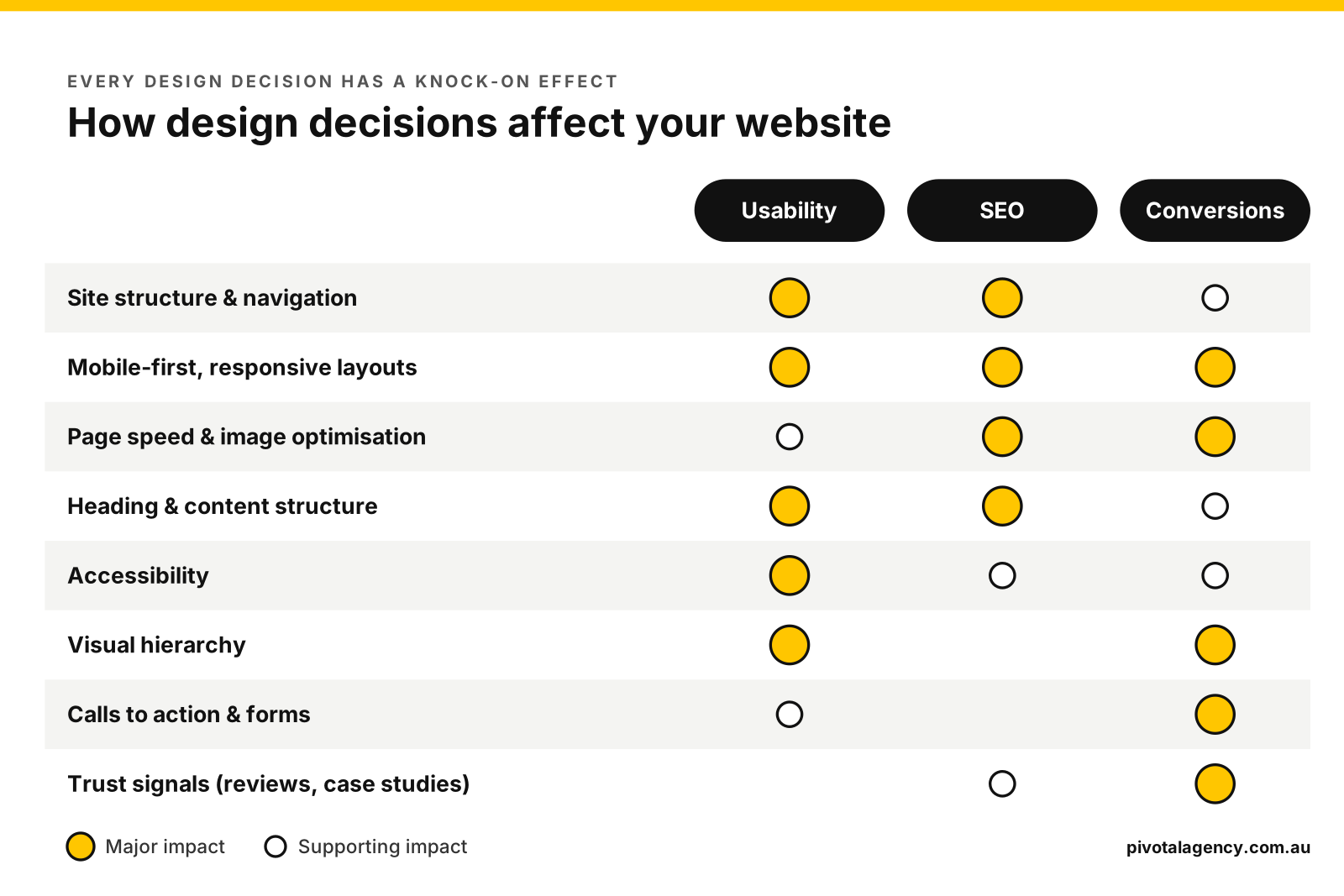
When we first wrote this article, the main point was simple: make sure the designer you hire actually designs for the web. That’s still true. But the bigger lesson after years of building websites is this. Almost every design decision on a website, from the layout of a page to the size of an image, has a knock-on effect on usability, search visibility and conversions.
This guide explains where web and graphic design differ, how specific design decisions affect your website’s performance, and what to look for when you choose who designs your next site.
Web design vs graphic design: what’s the difference?
Designers are not all created equal. Some are excellent at logos and print, some specialise in websites, and some are genuine all-rounders. The difference matters because a website isn’t a fixed image. It’s something people use.
From our experience here at Pivotal, we notice when a client brings in a graphic designer’s mockup to be built that it is commonly lacking a number of important considerations that make a design an effective online experience, and tool for business communication and conversions.
These issues range from functional problems such as bad mobile optimisation, absent EEAT (authority) signals, ineffective content hierarchy, poor UI/UX, lack of interactive and dynamic widget elements, and much more. To create web designs that actually function and communicate effectively, it’s essential to understand all these contributing factors.
Let’s get both the types of design defined so we can start to compare the differences between these areas of expertise, and why it’s important to engage with the right expert for the right job.
Graphic design is about visual communication. A graphic designer creates brand identities, logos, brochures, packaging, signage and social media assets. The finished piece usually has a fixed size and is viewed the same way by everyone.
Web design is about designing an experience people interact with. A web designer plans how pages are structured, how visitors move between them, and how every element adapts to phones, tablets and desktops. They also design with the build in mind: how the site will be developed in a CMS like WordPress, how fast it will load, and how search engines will read it.
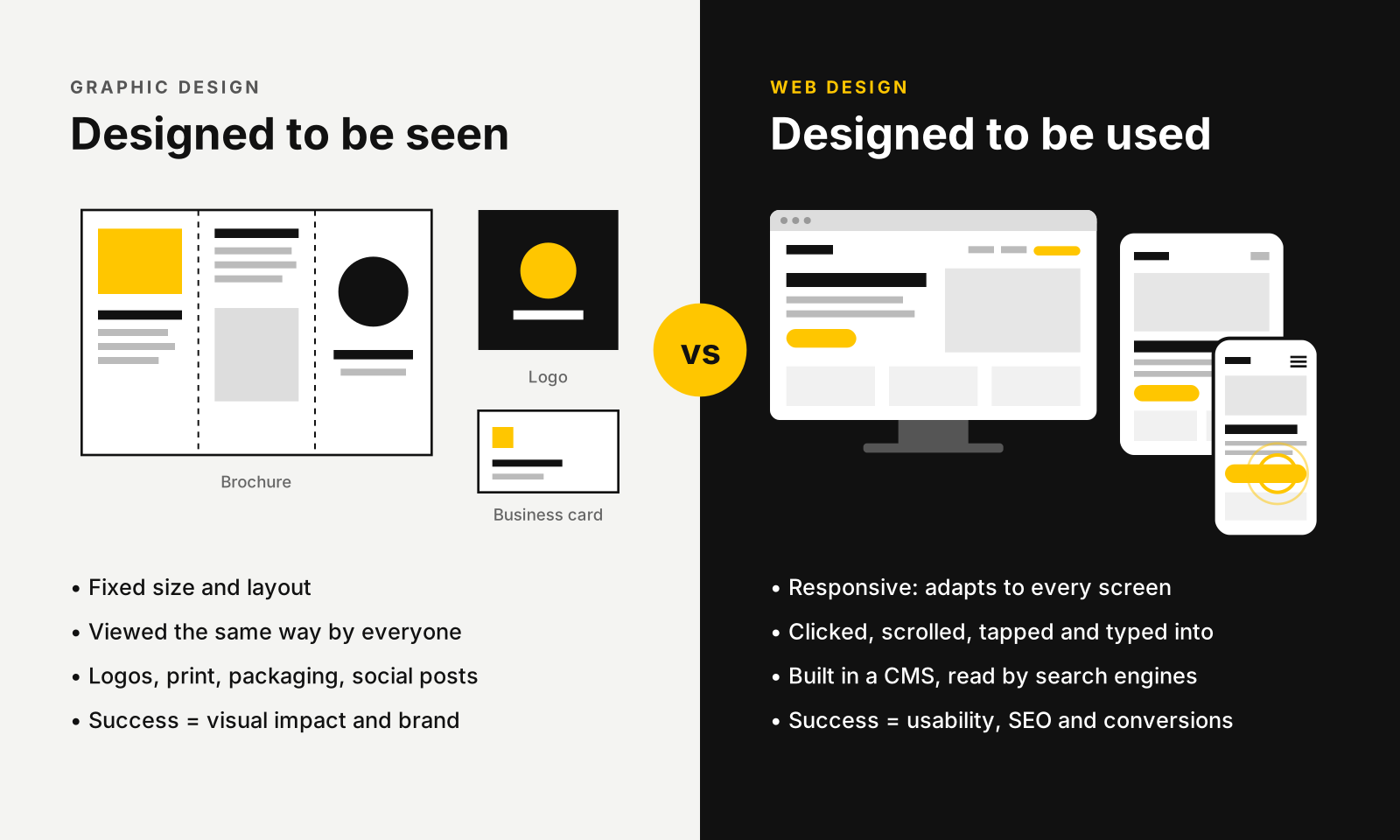
| Graphic design | Web design | |
|---|---|---|
| Main goal | Communicate a brand or message visually | Help people find information and take action |
| Medium | Print, packaging, signage, social posts | Websites and web apps, viewed on any device |
| Format | Fixed size and layout | Responsive: adapts to every screen size |
| Interaction | Viewed | Clicked, scrolled, tapped, typed into |
| Key skills | Typography, colour, composition, illustration | UX, information architecture, responsive layouts, accessibility, SEO awareness |
| Typical tools | Adobe Illustrator, InDesign, Photoshop | Figma, WordPress page builders, HTML/CSS prototypes |
| Measured by | Brand consistency and visual impact | Usability, search visibility and conversions |
The two overlap more than they differ. Strong web design is built on strong brand foundations: colours, type and imagery a graphic designer often creates first. Many businesses need both, in that order: brand first, then website.
How website design decisions affect usability
A beautiful website is wasted if people can’t use it. Usability is about getting visitors to the information they came for quickly, without friction, on whatever device they’re holding. These are the design decisions that matter most.
Clear structure and navigation. Plan the site map and wireframe the key page layouts before any visual design starts. Visitors should always know where they are, what the page offers, and where to go next. Keep main navigation to a handful of clear, plainly labelled items.
Mobile-first, responsive layouts. Print is designed for one size. A website is viewed on everything from a small phone to a wide desktop monitor. In Australia, mobile now accounts for almost half of all web browsing (48.6% in September 2026), so a site has to work just as well on a phone as on a desktop. Designing mobile layouts first forces you to prioritise what really matters, then expand for larger screens. Every element needs a plan for how it stacks, resizes or hides.
Consistency across browsers and devices. Chrome, Safari, Edge and Firefox can each render things slightly differently, and so can iOS and Android. A web designer designs with those differences in mind and tests on real devices, so the site works for everyone.
Readable content. Use comfortable font sizes, short paragraphs, descriptive headings and enough contrast between text and background. Most people scan before they read, so headings and layout should tell the story at a glance.
Accessibility. Designing to WCAG accessibility guidelines means considering colour contrast, keyboard navigation, alt text, form labels and tap-target sizes. It makes your site usable for people with disabilities, and it tends to make it easier for everyone else too. WebAIM’s 2026 analysis of the top one million home pages found 95.9% had detectable accessibility failures. Low-contrast text alone appeared on 83.9% of them.
Obvious buttons and links. Buttons should look clickable, be large enough to tap on a phone, and say what happens next (“Get a quote” rather than “Submit”).
How website design decisions affect SEO
SEO isn’t something added after a website is designed. Many of the factors that help a site rank are set during design, long before anyone writes a meta description.
Page speed and Core Web Vitals. Google measures how quickly pages load, how soon they respond to a tap or click, and whether the layout jumps around while loading. A Google and Deloitte study found that making a mobile site just 0.1 seconds faster increased progression to the enquiry form by 21.6% on lead generation sites. Design choices drive all three: oversized hero images, autoplay videos, heavy animation libraries, too many web fonts and sliders that shift content. A web designer plans visuals that look great and stay light.
Mobile-first indexing. Google’s own documentation says it uses the mobile version of your content for indexing and ranking. Content missing from the mobile version can cost you traffic. If content is hidden, cramped or missing on mobile, it can count against the whole page.
Content structure and headings. A logical heading hierarchy (one H1, then H2s and H3s) helps search engines understand what a page covers, and helps readers scan it. Designing layouts around real content, rather than lorem ipsum, means the structure works for both.
Site architecture and internal linking. How pages are grouped in the navigation, and how they link to each other, tells Google which pages matter most. A clear structure helps important pages get crawled and earn authority.
Images that work for search. Correctly sized and compressed images, modern formats like WebP, descriptive file names and alt text all help pages load faster and appear in image search.
Text that search engines can read. Key messages baked into images, or hidden in sliders and tabs, are harder for search engines and AI search tools to pick up. Important content should live in real, crawlable text on the page.
Good design also supports SEO indirectly. When visitors find what they need, they stay longer and engage more, and a well-designed site is easier for other sites to link to with confidence. Pair a well-designed site with search engine optimisation and local SEO to make the most of it.
How website design decisions affect conversions
A website’s job is to turn visitors into enquiries, bookings or sales. Design guides visitors along that journey, or puts obstacles in the way. Every visitor has to understand what you offer, trust you, and find it easy to act.
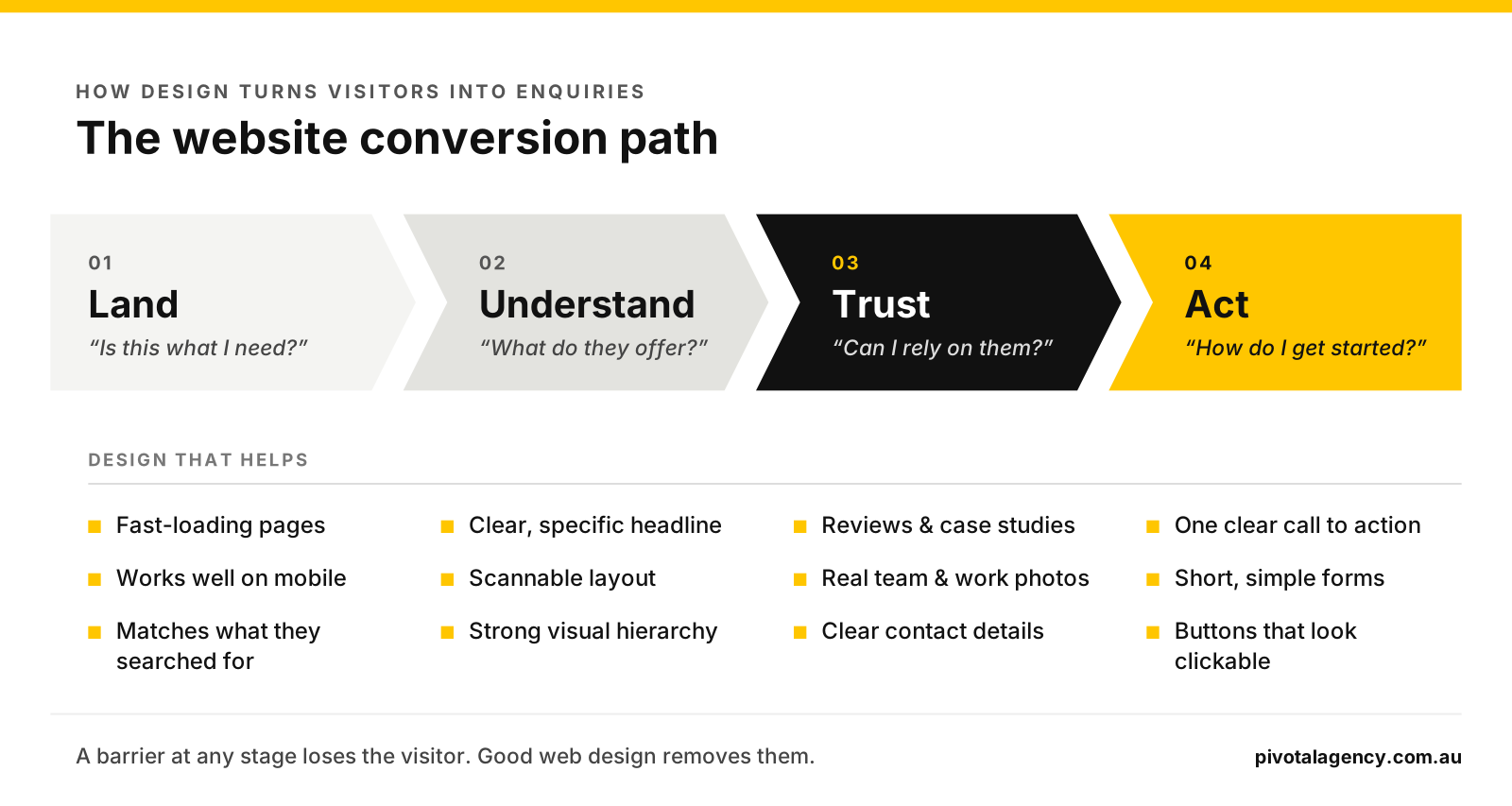
Understand: a clear first impression. Within a few seconds of landing, visitors should know what you do, who it’s for and why it matters to them. A specific headline and a relevant hero image beat a generic slogan over a stock photo.
Trust: visible proof. Reviews, case studies, client logos, certifications, real team photos and clear contact details all reduce doubt. Place them near the decisions they support, not only on an About page.
Act: a clear next step. Each page should have one primary call to action, repeated at logical points and visually distinct from everything else. Secondary actions (like “call us”) should be available without competing.
Low-friction forms. Ask only for what you need, label fields clearly, show helpful error messages and make forms easy to complete on mobile. Every extra field costs some enquiries.
Visual hierarchy. Size, colour, contrast and white space tell people what to look at first. Good web design uses them deliberately to lead the eye towards the conversion goal.
Speed. A slow page loses visitors before they see your offer. The same design decisions that help SEO help conversions too.
Conversion-focused design also makes paid traffic work harder. If you’re running Google Ads, a well-designed landing page can lower your cost per enquiry.
The website design and development process
Good outcomes come from a process where usability, SEO and conversions are considered at every stage, not patched on at the end. A typical website project looks like this:
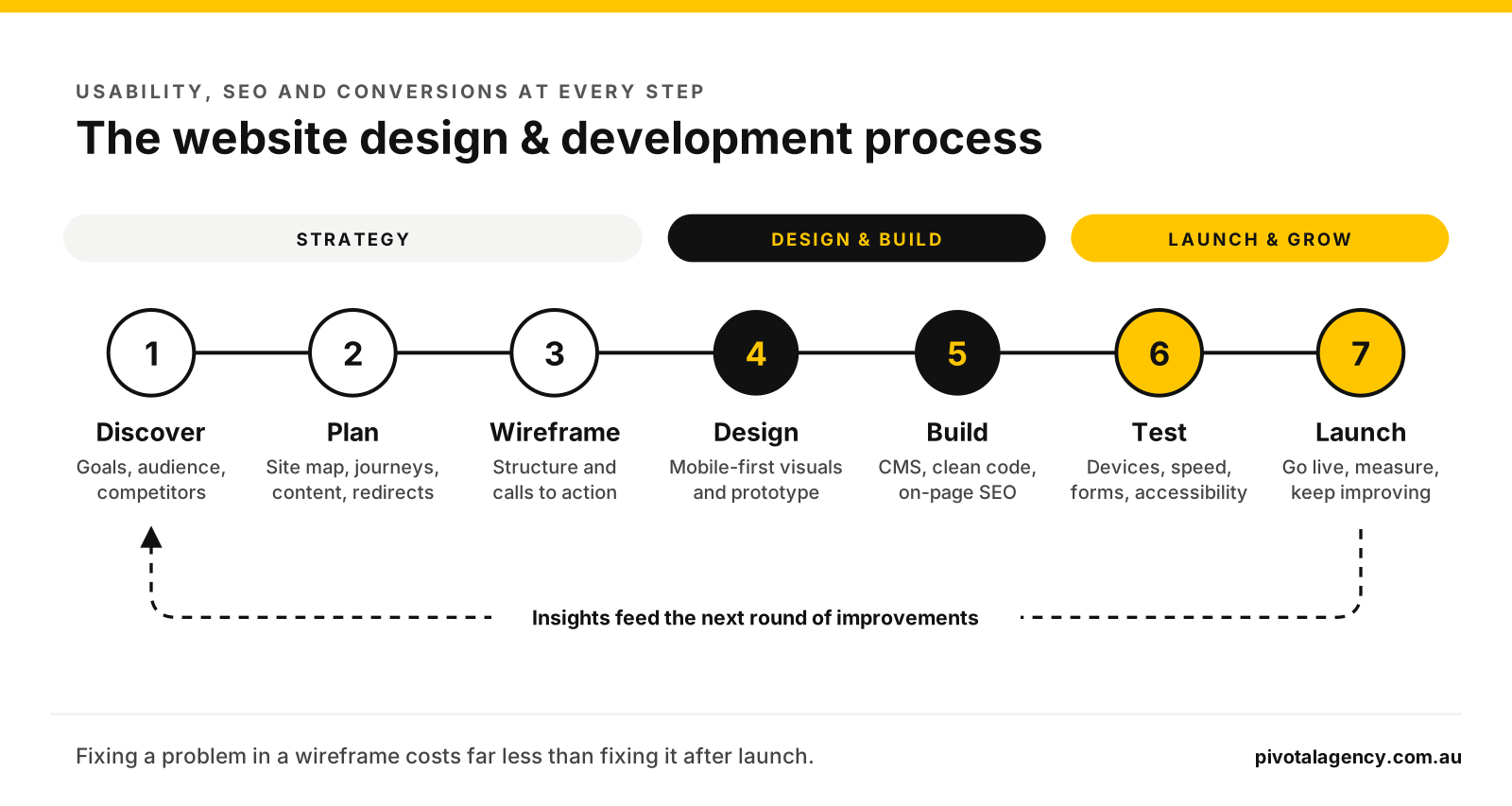
- Discover. Understand your business, audience, goals and competitors. Agree what a conversion is and how success will be measured.
- Plan. Map the site structure, key user journeys and content. If you’re replacing an existing site, plan redirects so you keep your search rankings.
- Wireframe. Lay out key pages in simple grey boxes to settle structure, hierarchy and calls to action before any visual design.
- Design. Apply your brand to create the visual design for mobile and desktop, usually in Figma or as an interactive prototype.
- Build. Develop the site in a CMS like WordPress, with clean code, optimised images and on-page SEO in place.
- Test. Check every page on real phones, tablets and browsers. Test speed, forms, accessibility and tracking.
- Launch and improve. Go live, monitor analytics and Search Console, and keep refining based on how people actually use the site.
Choosing the right designer for your website
Hiring a designer who isn’t experienced with the web usually results in a site that looks fine in a static mock-up but is hard to use, slow to load, difficult to rank and poorly set up for conversions. Before you commit, ask:
- Can I see websites you’ve designed recently, and can I use them on my phone?
- How do you approach mobile layouts and responsive design?
- Do you wireframe before designing?
- How do you consider SEO, page speed and accessibility in your designs?
- Who builds the site, and how do design and development work together?
- Will I be able to update content myself once it’s live?
- How will we know if the site is working? What will you measure?
If you’re still unsure, look through a recent portfolio and visit the live sites. How they work tells you more than how they look in a screenshot.
How Pivotal approaches website design
At Pivotal, our designers and developers work as one team. Designs are planned around how the site will be built, how it will rank and how it will convert, not just how it will look. Every project starts with strategy and wireframes, and is designed mobile-first, built in-house and tested on real devices before launch.
Because we also run SEO and Google Ads campaigns, we see what happens after launch and use that to shape design decisions on every new site.
When Cars4Us brought its car buying and selling businesses together under one brand, the new website had to combine two existing sites without disrupting the leads coming in. We started with a strategy and scoping phase to define the key offerings and conversion paths. One decision made a big difference: we split the enquiry form into two short steps, and each step sends the details to the CRM. If someone leaves halfway through, the lead isn’t lost. Combined with a mobile-first layout, advanced search and filtering, and Google reviews shown on site, the result is a site that helps customers go from browsing to enquiring, reserving or buying online. See the Cars4Us case study.
See more in our work or learn about our website development services.
Frequently asked questions
Some can, especially those with web experience. The key is whether they understand responsive layouts, usability, accessibility and how websites are built. Ask to use websites they’ve designed on your phone before you decide.
Web design covers how the site looks, is structured and works for users. Web development is building it: turning the design into a working site in code or a CMS like WordPress. The best results come when designers and developers work closely together.
UX (user experience) design is about how easy and logical the site is to use: structure, journeys and flow. UI (user interface) design is the visual layer people interact with: buttons, type, colour and layout. Good web design covers both.
Yes. Page speed, mobile usability, heading structure, site architecture and how content is presented all affect how well search engines can crawl, understand and rank your pages.
Common warning signs are high traffic with few enquiries, visitors leaving quickly from key pages, and forms that people start but don’t finish. Analytics and a review of the site on a phone usually reveal the biggest issues.
Not always. If your logo, colours and fonts still represent your business well, a web designer can build on them. If your brand feels dated or inconsistent, it’s usually worth refreshing it first, so the website is built on solid foundations.
Ready for a website that works as well as it looks?
Whether you’re planning a new site or wondering why your current one isn’t bringing in enquiries, we can help. Book a free strategy session and we’ll look at how your website’s design is affecting its usability, search visibility and conversions.