Most articles about SEO strategy read the same way: a list of ranking factors, a paragraph on keywords, a paragraph on backlinks, a nod to page speed, done. None of it tells you what a real strategy looks like once you sit down with a client’s site and start working through it.
This is what we do instead. Every SEO project at Pivotal Agency runs through three stages, on repeat: strategy, build, optimise.
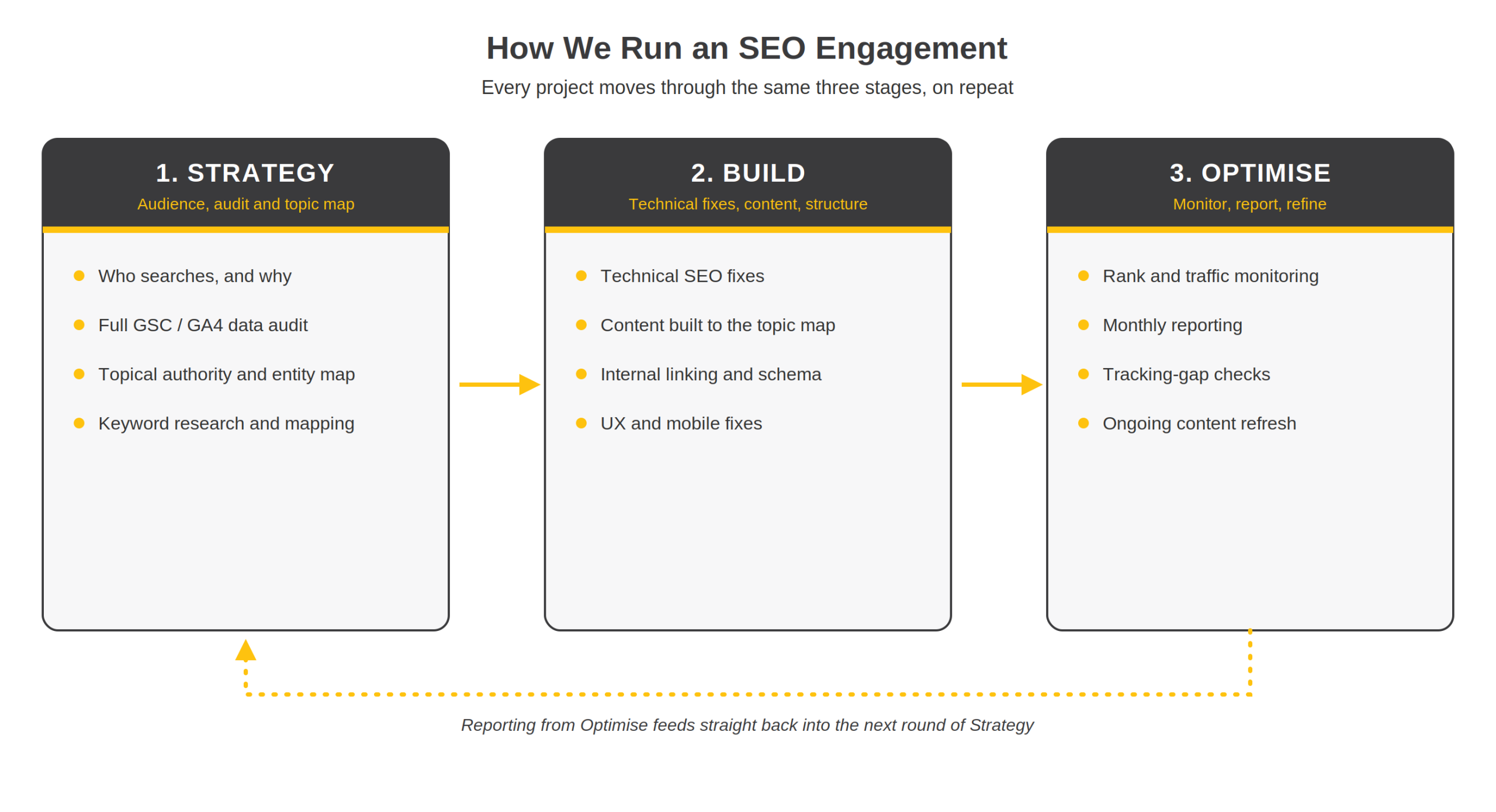
Strategy is where we work out what a site needs in order to rank, and for whom. Build is where that plan turns into pages, code changes and content. Optimise is what happens for the months (and years) after launch, once the site is live and generating its own data. Below is how each stage plays out, with the level of detail we’d walk a client through in a strategy session rather than a blog post written to rank for “SEO strategy.”
Step 1Work Out Who You’re Actually Trying to Reach
Understanding the audience beyond “target market”
Take a Gold Coast physio clinic. “Target market” tells you almost nothing useful. What matters is that someone searching at 11pm because they’ve thrown their back out and need an appointment tomorrow is a different person, with a different intent, to someone three weeks post-surgery researching long-term rehab options. Same business, two different pages, two different sets of language.
Auditing what Google already thinks of the site
The second question is a straight audit: crawl the site, pull Search Console and GA4 data, check what’s actually indexed against what should be indexed, and see which queries are already sending traffic. Skip this step and you end up recommending a keyword strategy the site has half-built by accident, or missing that a chunk of the blog is sitting outside Google’s index because of a robots.txt rule nobody remembers adding. Our discovery phase, a free audit and strategy session for anyone starting with us, exists specifically to catch this before a single hour of work gets billed.
Step 2Map Topical Authority and the Entity Relationships Behind It
Ranking a page for one exact phrase is a small win. Ranking a site as the answer to an entire topic, so it shows up for the fifty different ways people phrase a related question, is what actually moves revenue.
This is where topical authority and entity relationships come in. Google’s systems don’t just match strings of text anymore; they map entities (a service, a condition, a suburb, a product, a person) and the attributes and relationships that connect them.
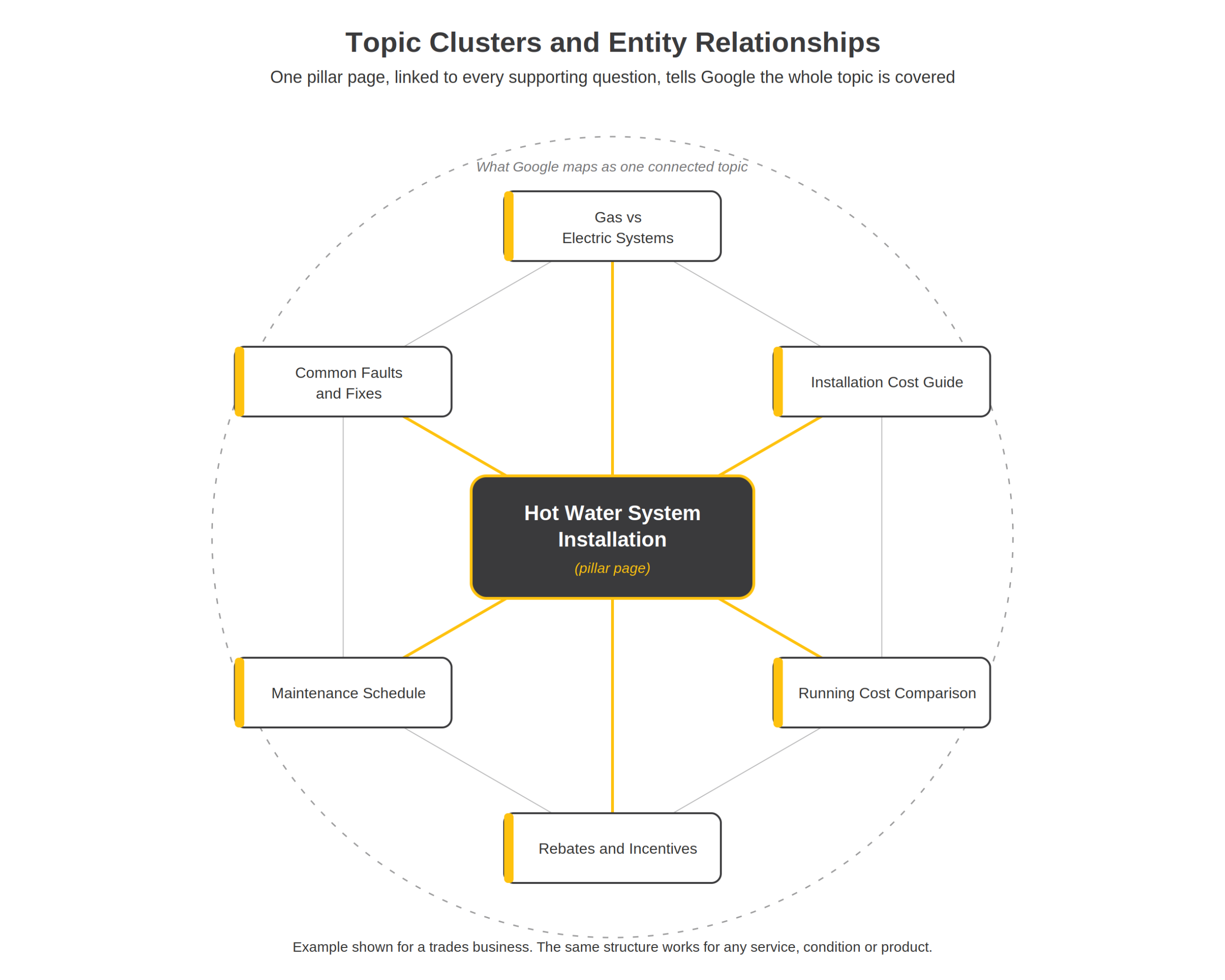
What topical authority actually means in practice
A site that only publishes “gutter guard installation Gold Coast” is competing on one phrase. A site that also covers gutter guard materials, bushfire mesh requirements, council rules on eaves, and maintenance schedules is telling Google, and increasingly the AI answer engines, that it understands the whole subject, not just the sales page.
Building the pillar and cluster structure
In practice this means building content in clusters: one core page for the main service, supported by pages that answer the surrounding questions a real customer would have, all linked to each other with contextual anchor text. Neil Patel’s write-up on topical authority is a good plain-English starting point on why this matters for rankings. For the more technical version, covering entity graphs, contextual hierarchies and how semantic matching actually works under the hood, Koray Tuğberk Gübür’s piece on theoretical SEO and topical authority is the deepest resource we point people to. We don’t expect every client to read either one in full, but the logic in both is what shapes how we plan a site’s content structure.
Step 3Read the GSC and GA4 Data Before Writing Anything New
Before writing a single new page, we go through the data that already exists.
Finding the real gaps
Search Console tells you what Google currently associates the site with: which queries it’s showing up for, at what position, with what click-through rate. Compare that against what the business actually sells and you’ll usually find gaps, such as:
- Pages ranking for the wrong intent
- High-impression queries with almost no clicks (usually a title tag or meta description problem, not a rankings problem)
- Entire service lines with no search visibility at all
Pulling the data properly before drawing conclusions
Both platforms have limits worth knowing before you build a strategy on top of them. Exports cap out at a certain number of rows, sampling can kick in on higher-traffic properties, and date ranges don’t always line up cleanly between tools. We pull the underlying data rather than relying on a single dashboard view, and we scope any claim (branded versus non-branded traffic share, for instance) to what the data can actually support, rather than presenting a rounded figure as gospel.
We also cross-check GA4 against Search Console for gaps. A sudden drop in either one is, more often than not, a tracking problem (a tag that stopped firing, a consent banner blocking analytics, a platform migration that lost historic events) rather than an actual fall in traffic. Chasing a “ranking drop” that’s really a broken tag wastes weeks. We check the tracking setup first, every time, before we act on a chart.
Step 4Turn the Research Into an Actual Content Plan
Once we know the audience, the topic map and what the data says the site is missing, the content strategy is the join between them. In practice this looks like a content calendar built around search intent stages: informational, commercial and transactional.
| Intent stage | What it looks like |
|---|---|
| InformationalDoesn’t yet know what they need | An explainer page that answers the question someone has before they know what to search for next |
| CommercialComparing options | A comparison or “what to look for” page for someone weighing up providers or products |
| TransactionalReady to act | A page built to convert: clear next step, minimal friction, booking or contact front and centre |
Every content plan gets checked against what the business can genuinely deliver before it goes anywhere near a brief, so the pages that go live match what actually happens once a customer gets in touch.
Step 5Keyword Research and Keyword Mapping
Keyword research isn’t a one-off list handed to a writer. It’s a mapping exercise: which primary keyword does this specific URL own, which synonym and related terms support it, and, just as important, which pages should not compete with each other for the same query.
Primary keywords, synonyms, and where each one lives
A tradie site might have several phrases all pointing at the same intent:
| Search term | Where it maps |
|---|---|
| Hot water system replacement | Core service page |
| Hot water system installation | Core service page |
| New hot water unit | Core service page |
| Gas vs electric hot water | Supporting page (adjacent question) |
| Hot water system running costs | Supporting page (adjacent question) |
| Hot water rebates Queensland | Supporting page (adjacent question) |
Rather than building three thin pages that cannibalise each other in search results, we map all three primary variants (plus the long-tail variants a tool like Google Keyword Planner or SEMrush surfaces) to a single, properly built page, and let supporting content handle the adjacent questions. That mapping document becomes the reference for content briefs, internal linking and, later, reporting.
Step 6Fix the Technical SEO Foundations First
None of the above matters if Google can’t crawl, render or index the pages properly. Technical SEO is the least visible part of a strategy and the part most likely to quietly cap performance for months before anyone notices.
Common technical issues we run into
- A WordPress site with three SEO plugins fighting over the same meta tags
- An eCommerce store where faceted navigation (filter by size, colour, price) generates thousands of near-duplicate URLs that dilute crawl budget
- A site migration that dropped 301 redirects and sent link equity straight to a 404 page
- Core Web Vitals failing on mobile because of unoptimised hero images or render-blocking scripts
- Key content rendered client-side in a way that search engines (and AI crawlers) can’t read without executing JavaScript first, common on sites built with heavier front-end frameworks
Structured data and schema
Correct schema markup, tested through Google’s Rich Results Test rather than assumed to be correct because a plugin says so, is what earns star ratings, FAQ drop-downs and other rich results in the search listing. It’s also one of the clearer signals we can hand an AI crawler about what a page actually is.
Step 7UI, UX and Mobile: What Happens After the Click
Ranking gets someone to the page. Design decides whether they stay, understand what’s on offer, and take the next step. Mobile matters more than most site owners assume, because Google indexes and ranks based on the mobile version of a page, not the desktop one.
What we check on mobile
- Whether tap targets (buttons, menu items) are large enough to hit accurately
- Whether a phone number is actually clickable
- Whether a booking or contact form works one-handed
- Whether the page layout holds up on a genuinely small screen, not just a resized browser window
- Load time on a phone in patchy regional coverage, not just on office wifi
A confusing mobile menu, a contact form that times out, or a slow-loading page will undo a lot of ranking work. These aren’t design preferences. They’re the difference between traffic that converts and traffic that bounces straight back to the search results.
Step 8Measurement and Reporting: What We Track, and How
Rankings are one input, not the scoreboard.
What we report on
- Organic traffic by landing page and intent
- Keyword position movement for the terms mapped in the strategy
- Leads, bookings or revenue attributable to organic search
A reporting quirk worth knowing
If you use AgencyAnalytics or a similar platform yourself: the raw metrics pulled from an API and the numbers shown on a pre-built dashboard widget don’t always match, because of differences in date ranges, sampling or how a metric is calculated. When we see a discrepancy, we reconcile it against the dashboard rather than reporting two different numbers to a client and hoping nobody asks. If a number looks wrong, we say so and explain why, rather than rounding it into something that looks tidier than the data actually is.
What This Means for AI Search (ChatGPT, Perplexity, Google AI Mode)
The same groundwork that builds topical authority for Google, clear entities, well-structured content, direct answers to real questions, clean technical markup, is what gets a business referenced in ChatGPT, Perplexity and Google’s AI Overviews. There’s no separate playbook for ranking in AI search. A site that clearly explains what it does, who it’s for, and backs that up with accurate, well-organised content gives both a search engine and an AI model the same thing to work with. We treat this as part of the standard build now, not an add-on: proper entity markup, a clear first paragraph that actually answers the question in the heading above it, and content structured so a system can lift an accurate answer out of it.
Bringing It Together: Strategy, Build, Optimise
Strategy without a build plan is a document nobody executes. A build without ongoing optimisation is a site that ranks well for six months and then quietly slides as competitors keep publishing and Google keeps updating. The reason we run every engagement as strategy, build, optimise, rather than a single audit and a list of recommendations, is that SEO doesn’t stay finished. Most clients see early movement in the first four to eight weeks, with the stronger gains showing up over three to six months, and optimisation is what keeps that trajectory going rather than flattening out.
If you want to see what this looks like against your own site, our SEO services page has more information, and you can book a strategy session and we’ll walk you through the audit process.
