Search engine optimisation (SEO) is the work of organising your website so Google and other search engines recognise your real-world capability, understand what you sell, and recommend your business to people looking for your services.
When someone opens Google to solve a problem, search results present a variety of formats: an AI Overview summarising the answer directly, a local map box showing three nearby businesses, sponsored listings, and standard organic links.
You do not need an engineering degree or complicated industry jargon to understand how search works. Just like Google’s own Search Starter Guide, this guide breaks down search into practical areas: how Google sees your site, how to help Google find your pages, how to make your website genuinely useful to visitors, and how to control how your business appears across search results.
1. What Search Means Today: Traditional Links, Maps, and AI Overviews
When someone runs a search, modern algorithms focus on answering user problems using the most dependable information available. Google presents information through three primary channels:
Traditional Organic Results
These are standard clickable web page listings. Google ranks these pages based on how thoroughly they answer the searcher’s query, how easy the site is to read, and how trustworthy the domain is considered by other websites.
Google AI Overviews
For many informational questions, Google displays an AI Overview at the top of search results. These modules generate a direct, synthesised summary drawn from multiple high-authority web pages. Earning visibility in AI summaries requires clear, factual statements, well-structured headers, and answers that get straight to the point without filler text. Learn more about how generative answer engines extract information in our guide on SEO, AEO, and GEO explained.
The Local Map Pack
For searches with local geographic intent (such as “commercial air conditioning Gold Coast” or “retaining wall builder Brisbane”), Google presents a prominent map block with three highlighted businesses. This map pack pulls data directly from verified Google Business Profiles, customer reviews, and physical business locations. To see how to secure these top spots, review our breakdown on optimising Google’s Local Pack.
2. How Google Sees Your Website
Before any page on your website can appear in search results or AI summaries, Google goes through three distinct stages:
Finding Your Pages (Crawling)
Google uses automated programs called crawlers or spiders (the main one being Googlebot) to discover pages across the internet. Crawlers move from page to page by following links. If you publish a new page but do not link to it from anywhere on your website, Googlebot may never find it.
Reading and Storing Your Content (Indexing)
Once a crawler visits your page, Google attempts to understand what the page is about. It analyses the written text, reviews image descriptions, and runs code files to see how the page displays.
If the page is clear, original, and technically accessible, Google saves it in a vast global directory called an index. If a page has very little text, duplicates another page on your site, or loads with severe technical errors, Google may skip indexing it entirely. If a page is not indexed, it cannot appear in search results.
Serving the Best Answers (Ranking)
When someone enters a query into Google, the search engine evaluates its index to select the most relevant, reliable pages. It considers hundreds of factors: does the page directly solve the searcher’s problem, does the website work properly on a mobile phone, and does the business have a verified track record?
3. Helping Search Engines Find and Understand Your Pages
You make it easy for Google to crawl and index your website by organising pages in a clean, logical structure.
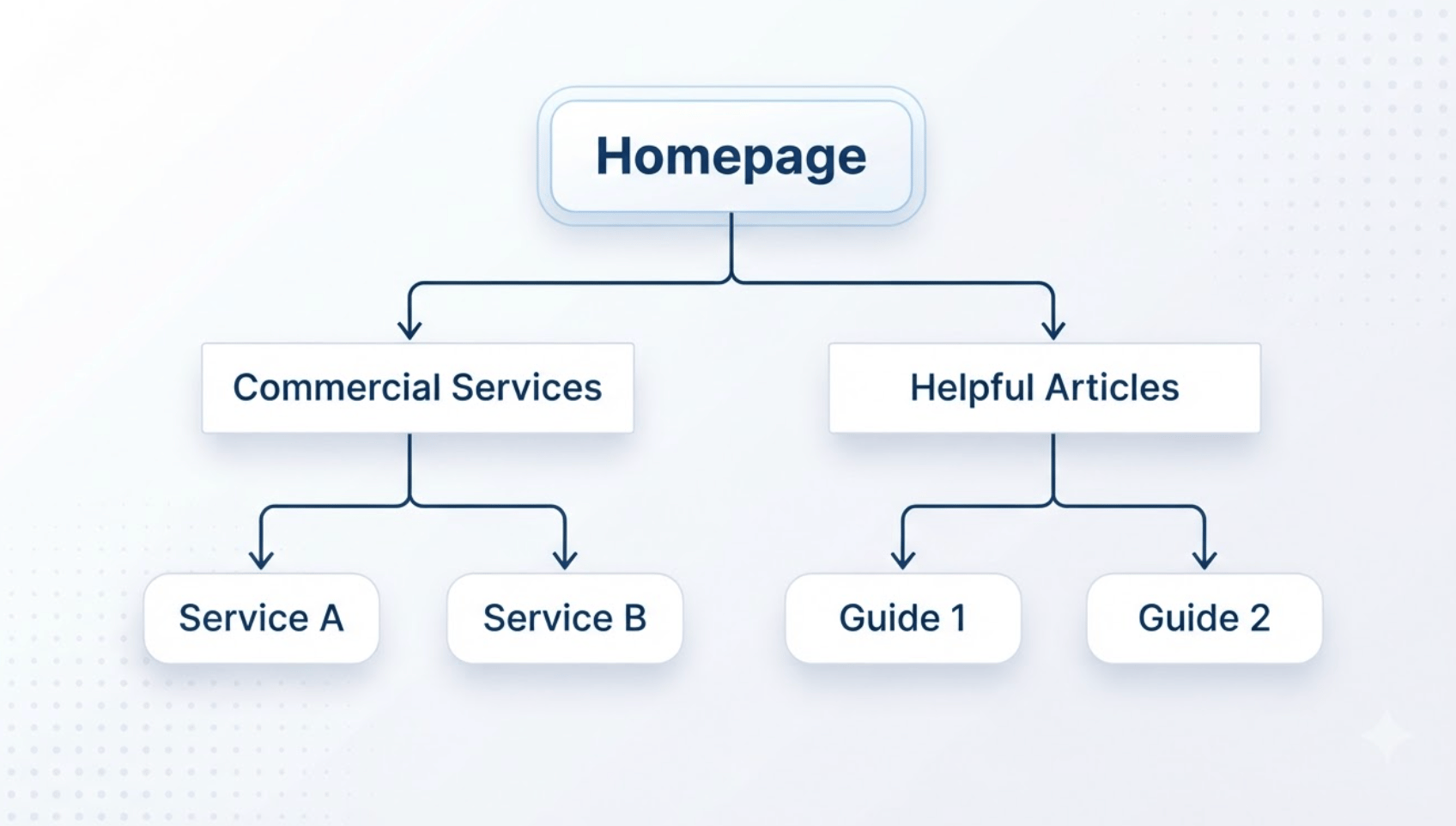
Give Your Website a Clear, Simple Outline
Structure your site like a well-kept filing cabinet. Group related services together so both visitors and crawlers can move through your site naturally:
- Homepage: A direct, clear introduction to who you are, what you do, and where you work.
- Primary Category Pages: Clear hubs covering your main commercial capabilities (for example, “Industrial Racking”).
- Specific Service Pages: Individual pages dedicated to specific services (such as “Selective Pallet Racking” or “Cantilever Racks”).
- Helpful Guides and Articles: Answers to common buyer questions (such as “Pallet Racking Inspection Standards”).
Keep Page Addresses (URLs) Readable
A clean URL gives both users and search bots immediate context before they click.
- Good: example.com.au/services/commercial-plumbing/
- Confusing: example.com.au/index.php?cat_id=982&item=44
Use plain, lowercase words separated by simple hyphens, and avoid long, jumbled strings of numbers or symbols.
Connect Your Pages with Internal Links
Every time you write a helpful article answering a customer question, add a link pointing back to your main commercial service page using descriptive words.
If you publish an article about how often commercial racking needs safety checks, include a natural link to your racking inspection service page. This shows search engines which pages on your site are your primary commercial hubs.
Keep a Clean Map for Search Crawlers
Submit an XML sitemap through Google Search Console. A sitemap is a structured XML file listing all your live, public pages, acting like an inventory list that helps Googlebot find newly added content quickly.
4. Making Your Website Useful to Real People
The single most reliable way to rank well on Google is to build a website that visitors find genuinely helpful. Google designs its ranking systems to reward pages that satisfy real user needs rather than pages created purely to satisfy an algorithm. Exploring why SEO connects with content marketing shows why useful information outperforms artificial keyword tactics.
Answer the Searcher’s Question Immediately
When someone lands on your page from search, they want an answer right away. If they have to scroll past three stock photos and four paragraphs of vague introductory text, they will leave and click on a competitor’s link.
Write in Natural Language
Repeating the same keyword phrase excessively makes text difficult to read and triggers penalties for keyword stuffing.
Write naturally, the same way you explain your trade or service to a client across your desk:
- Use clear sub-headings (H2 and H3 tags) to break your content into scannable chunks.
- Use bullet lists and comparison tables to make complex specifications easy to digest.
- Include genuine details that show hands-on experience, such as project turnarounds, building codes, or material choices.
Build Fast Pages That Work on Mobile Phones
Over 60% of commercial searches occur on mobile phones, and Google evaluates websites using a mobile smartphone crawler. Understanding what mobile-first indexing means is fundamental for any modern site owner.
If your site takes four seconds to load on a 4G mobile connection or text jumps around while buttons are loading, visitors leave. Keep your site fast by:
- Compressing photos into modern WebP formats before uploading them.
- Removing bulky, unused script files or unnecessary website plugins, following practical ways to improve website speed.
- Using fast, local hosting servers so pages load quickly for local visitors.
5. Controlling How Your Business Appears in Search
You have direct control over the text and images that search engines display when presenting your website to prospective buyers.
Page Titles (Meta Titles)
Your page title is the clickable headline that appears in search results and browser tabs. Keep it under 60 characters so it fits cleanly on mobile screens without being cut off.
Search Descriptions (Meta Descriptions)
The short paragraph shown beneath your page title is your meta description. While this summary does not directly influence where you rank, an honest, informative description encourages searchers to choose your link over others. Keep this between 140 and 160 characters. For practical formulas, see our walkthrough on writing effective title tags and meta descriptions.
Image Descriptions (Alt Text)
Search engines cannot look at pictures the way people do. When you add photos to your pages, include a short alternative text description (alt text).
- Good Alt Text: Licensed plumber installing backflow valve on commercial site
- Unhelpful Alt Text: IMG_93829.jpg or plumber best plumbing gold coast cheap
Accurate alt text helps vision-impaired users using screen readers and helps search engines verify that your photos show real, relevant work.
6. Proving Real-World Credibility to Search Engines
Search engines want to recommend businesses that demonstrate genuine experience, formal credentials, and community trust. Google calls this framework E-E-A-T (Experience, Expertise, Authoritativeness, and Trustworthiness).
The Pillars of Real Credibility
| Pillar | What it shows |
|---|---|
| Experience | Real on-site photos, case studies |
| Expertise | Formal trade licences and degrees |
| Authority | Industry registrations and media links |
| Trust | Clear contact info, reviews, HTTPS |
You can show this credibility naturally throughout your website:
- Show Real Work: Publish original photos of your team, work vehicles, workshops, and completed local projects rather than relying on generic stock photos.
- List Professional Credentials: Prominently display trade licences (such as QBCC licences in Queensland), safety accreditations, and memberships in professional associations.
- Be Transparent: Make your trading name, Australian Business Number (ABN), physical street address, phone number, and opening hours easy to find in your website footer and contact page.
Earning Genuine Backlinks
A backlink is a link on an external website that points to your site. Search engines treat backlinks from reputable websites as votes of confidence.
Avoid paying third parties for packages of low-grade directory links. Modern algorithms filter out artificial link schemes. Instead, build links through authentic business relationships:
- Local Chambers and Trade Groups: Join your local chamber of commerce or trade register.
- Suppliers and Wholesale Brands: Ask the equipment manufacturers or distributors you work with to list you on their official “Authorised Dealers” or “Where to Buy” pages.
- Community Ties: Sponsor local sports clubs, school initiatives, or charities that maintain links to sponsor pages.
7. Local Search: Winning the Map Pack
For businesses that serve a specific city, region, or set of suburbs, Google’s Local Map Pack produces a high volume of direct phone calls and enquiries. Our dedicated local SEO services focus specifically on building this regional prominence.
Complete Your Google Business Profile
Fill out every single field in your profile. Select the primary business category that matches what buyers actually search for (for example, choose “Air Conditioning Contractor” rather than general “Mechanical Contractor”).
List your correct opening hours, upload photos of your physical premises or service vans, and outline your complete list of services.
8. Measuring What Actually Matters
Search engine optimisation is an investment in long-term capability. Managing your search presence requires watching practical business outcomes rather than worrying about minor daily ranking fluctuations. Review our diagnostic breakdown on small business SEO audits to see what metrics correlate directly with commercial revenue.
Use two free tools provided directly by Google:
Google Search Console (GSC)
Google Search Console tells you how search engines view and index your site:
- Track how many people see your listings and click through to your pages.
- Discover the exact search phrases real people type before landing on your site.
- Identify any technical errors preventing pages from being indexed.
Google Analytics 4 (GA4)
Google Analytics tracks what visitors do after arriving on your website:
- Measure how many visitors click your telephone number, submit a quote form, or book an appointment.
- Identify which specific service pages generate commercial enquiries.
- Check how long visitors spend reading your articles and which sections hold their interest.
Common Mistakes Beginners Should Avoid
- Chasing Broad Vanity Keywords: Spending months trying to rank for a single broad word like “builder” or “plumbing”. These terms attract casual researchers or people from overseas who will never hire you. Focus on specific terms with clear commercial intent, like “commercial warehouse racking Brisbane”.
- Copying Text Across Dozens of Suburb Pages: Creating identical pages where only the suburb name is changed. Google filters out duplicate pages that provide no unique value to the reader.
- Ignoring Mobile Screen Layouts: Checking your website exclusively on a wide office computer screen while ignoring how small text and buttons appear on a smartphone.
- Treating SEO as a One-Time Job: Making a few title tag edits and expecting permanent top rankings. Search engines, local competitors, and customer habits change continuously, requiring regular reviews and content updates.
Build a Sustainable Search Strategy with Pivotal
Earning steady visibility across search engines comes down to connecting your real-world capability with clear website structure and genuinely helpful content. To see how we structure multi-phase campaigns from data discovery to ongoing technical growth, read our complete SEO strategy framework.
At Pivotal, our in-house team combines technical development, local search management, and content planning to help commercial operators build lasting search pipelines.
Learn more about our search engine optimisation services or speak with our team to review your website:
